MPPI Critics Debugging & Tuning
Demo available here. Note: registration required.
Overview
The Model Predictive Path Integral (MPPI) is a sampling-based predicitive controller to select optimal trajectories, commonly used in robotics community and well supported by the Nav2 stack.
The core feature of Nav2’s MPPI plugin is its set of objective functions (critics), and can be tuned to achieve a desired behavior for robot planner.
In this demo, we investigate a target behavior where the robot (Locobot) should avoid moving backward. This is prefered by robotic practitioners, and also due to the safety concern in indoor environments, where there can be human or pets, and it’s dangerous for standard robots (i.e: with only front-facing sensors) to move backward without any observation/awareness.
This behavior often occurs due to that, when in sharp turn or a replan asking the robot to turn around (large angular distance), Nav2 MPPI’s Path Angle critic is usually activated and contributes to the scoring. However, it tends to cause the robot to move backward to achieve efficient angular alignment with the planned path.
Initial Idea
Most intuitive solution is to use the Prefer Forward critic, and tune its weight so that its cost contribution is higher than Path Angle critic, to counter backward behavior. However, some questions remain if you tune this manually (i.e: blindly adjusting weights):
- How to numerically see these costs in real values? and compare between the two metrics to see which one is higher
- How to quickly & easily verify different potential weight values (can be many if uncertain about which critic) along side the result trajectories?
With Artefacts, we support these answers:
- Numerical critic costs debugging: this feature is only recently developed for ROS Kilted by Nav2, we migrated its MPPI plugin down to Humble version and integrated into our plotting toolkit.
- Parametrized weight values: quickly run these parametrized scenarios in parallel on our cloud infrastructure, and easily view critics costs side-by-side result trajectories, with Artefacts dashboard’s runs comparison.
Parametrizing the Test
The artefacts.yaml sets up the test and parametrizes as follows:
nav2_mppi_tuning:
    type: test
    runtime:
      framework: ros2:humble
      simulator: gazebo:harmonic
    timeout: 10 # minutes
    scenarios:
      defaults:
        output_dirs: ["output"]
        metrics: "output/metrics.json"

        params:
          controller_server/FollowPath.PreferForwardCritic.cost_weight: [0.0, 5.0, 70.0]

      settings:
        - name: reach_goal
          pytest_file: "src/locobot_gz_nav2_rtabmap/test/test_mppi.py"
Key points:
- The test is conducted using
pytest, andpytest_filepoints to our test file - Artefacts will collect the files inside the folder defined in
output_dirs, and upload to the dashboard. controller_server/FollowPath.PreferForwardCritic.cost_weight: parametrizes the weight values (obtained after observing the critic costs debugging plot). The syntax here indicates a ROS param, following this format:[NODE]/[PARAM], and can be found in Nav2 parameters.yamlfile.
The test will run three times with three weight values: 0.0 (no contribution), 5.0 (medium contribution), 70.0 (high contribution).
Quick analysis
Artefacts dashboard’s runs comparison visualizes critics debugging plot (“Critics vs Time”) and result trajectories plot (“odom vs gt positions”). Here odom is the estimated odometry of robot and can be ignored, we pay attention to gt ground truth positions.
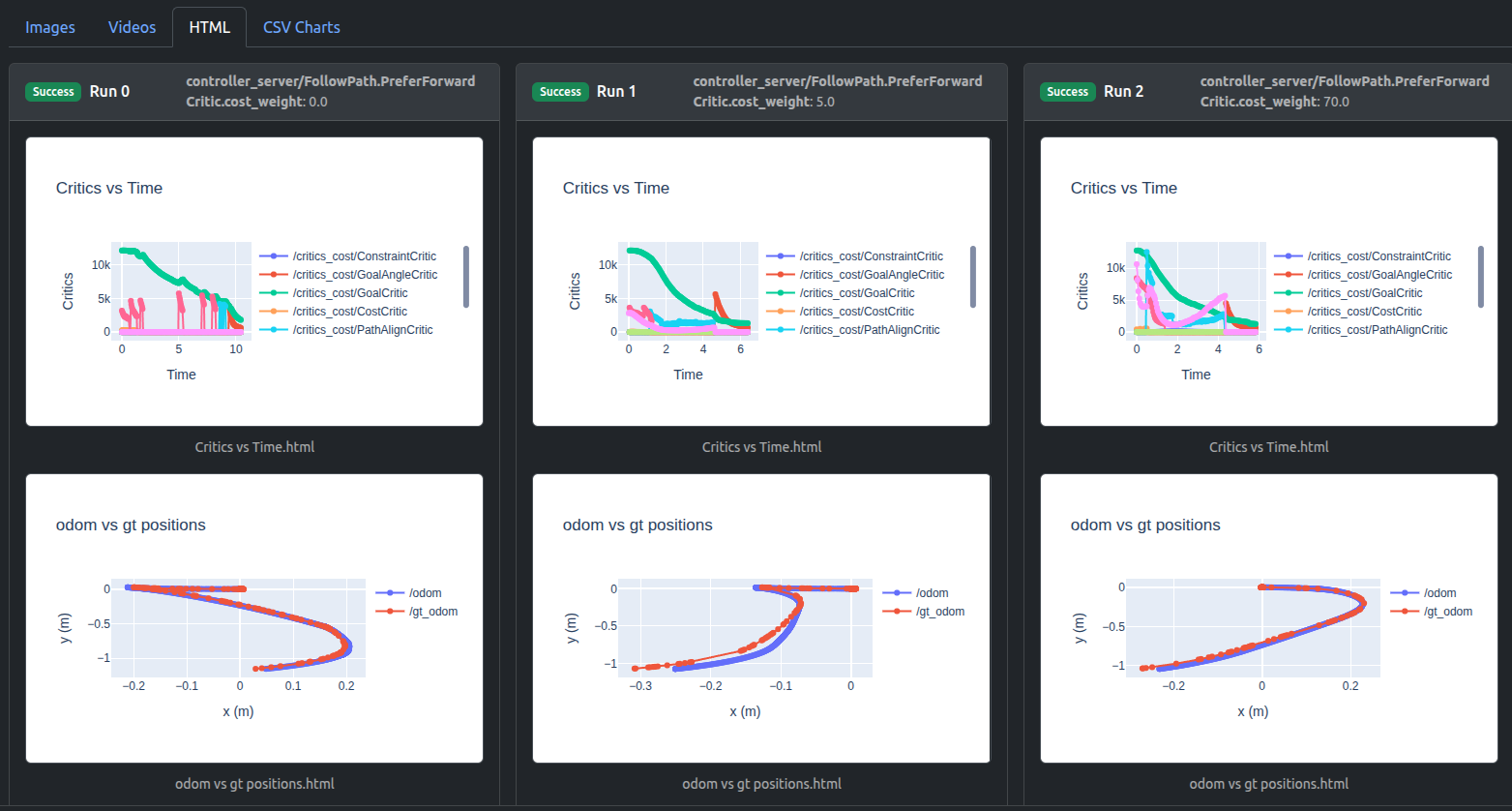
For critics debugging plots, you can isolate critics of interest by double-clicking on one critic, then single-click any next critic:
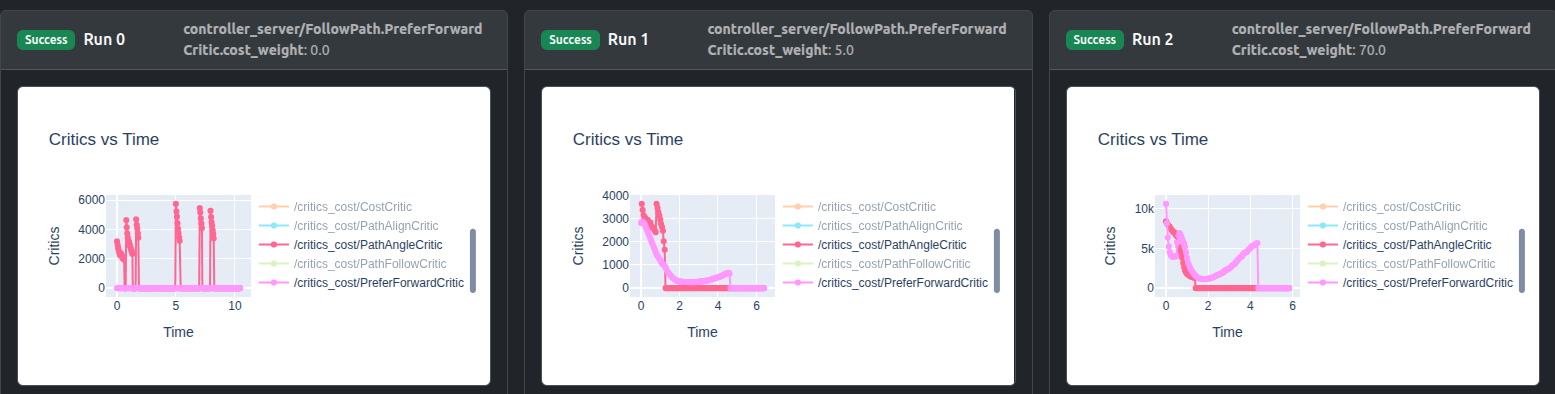
It can be seen that weight 0.0 leads to zero cost contribution, weight 5.0 raises PreferForwardCritic contribution to nearly same as PathAngleCritic, whereas weight 70.0 can sufficiently surpass its contribution.
The trajectory plots (either in HTML or CSV formats) indicate the influence of increasing PreferForwardCritic contribution:
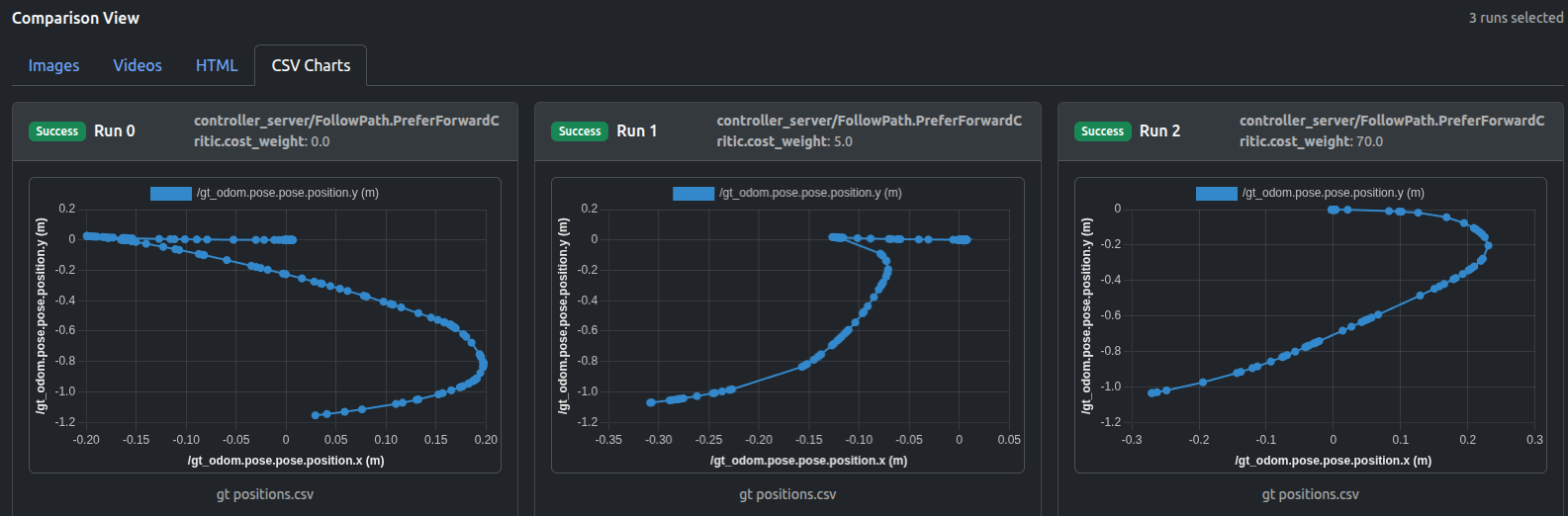
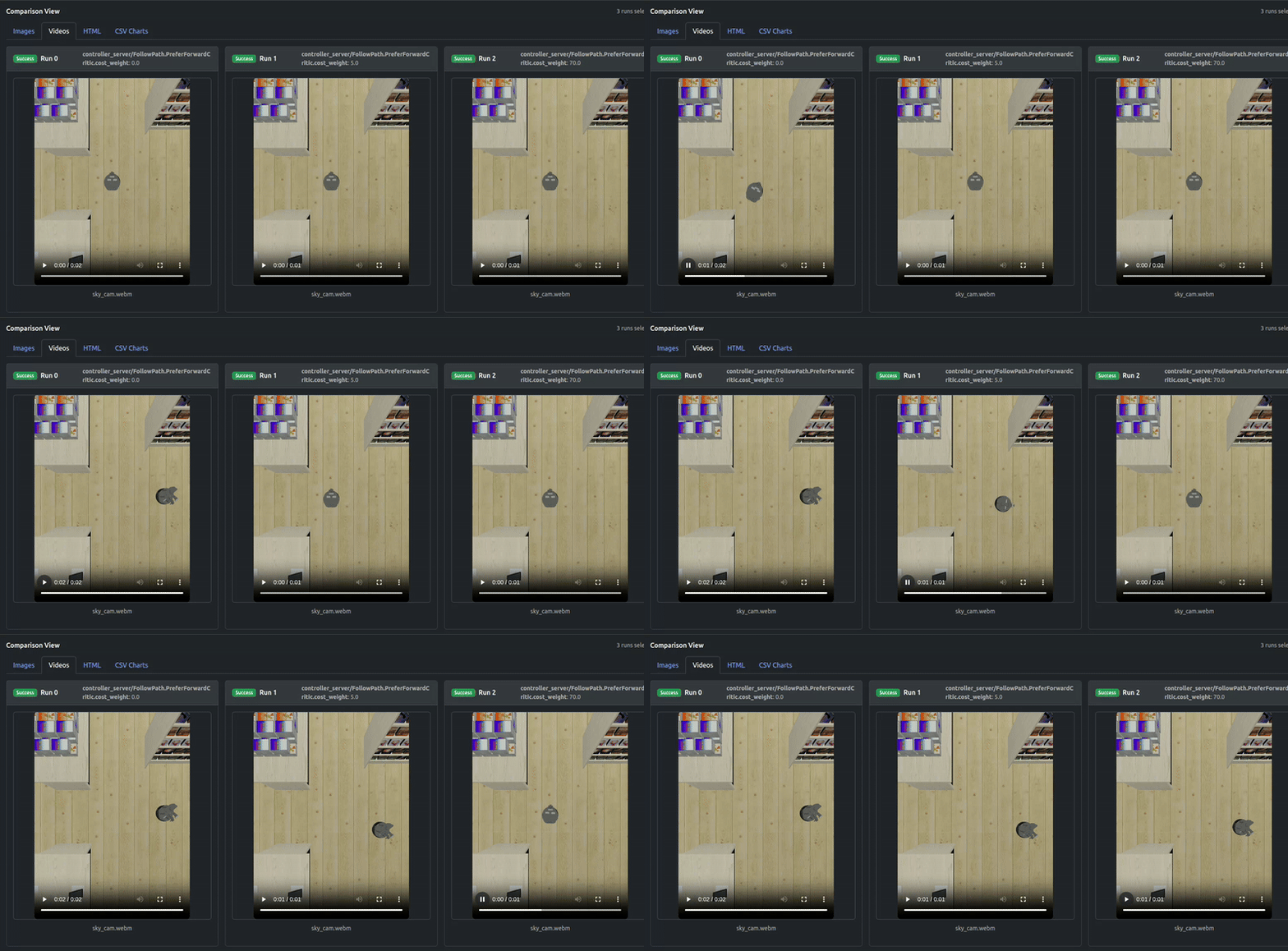
It can be seen that not until the contribution of PreferForwardCritic surpasses PathAngleCritic (weight 70.0), there remains some “moving backward” behavior of robot, whereas weight 70.0 can successfully guarantee the Locobot only moves forward.
The output videos also confirm the results:
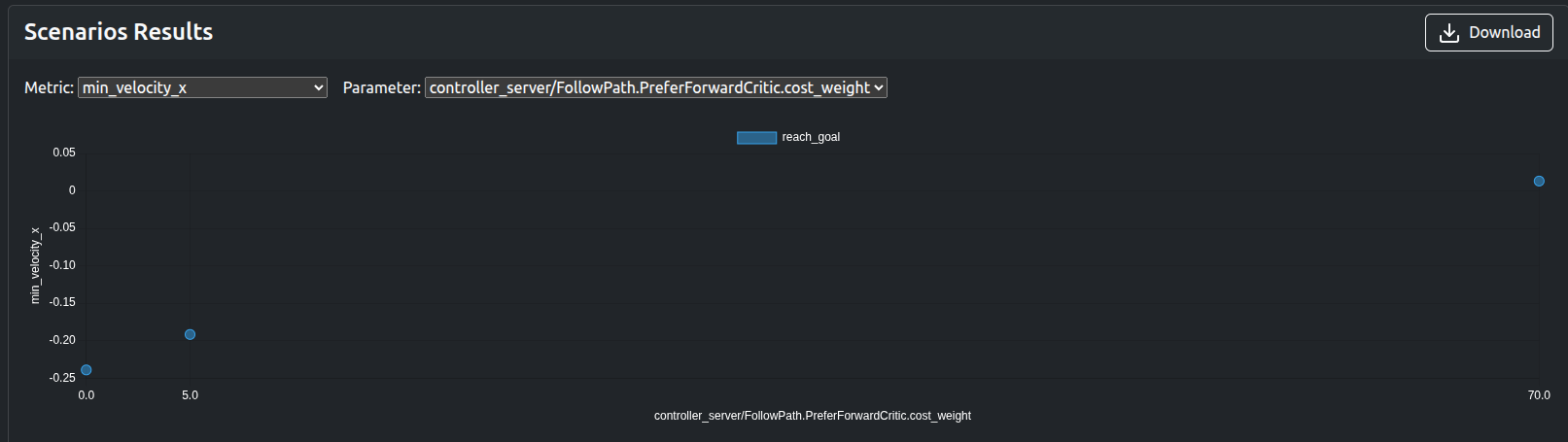
The numerical metrics such as min_velocity_x, traverse_time, traverse_dist, PreferForwardCritic.costs_mean can be used to quickly verify the results without visualization:
Remarks
The PreferForwardCritic (soft constraint) was targeted in this demo for tuning process to avoid robot reversing, but another approach can be simply setting vx_min = 0.0 (hard constraint), which prevents the controller from sampling any negative forward velocity (essentially a hard ban on reversing). Increasing the weight for “soft constraint” makes forward motion much more likely, but if every forward sample is worse (i.e: path blocked, goal behind robot in a tight corridor), MPPI can still choose a reverse trajectory, which is not possible in the “hard constraint” case.
However, if you start off with the simplest approach (setting vx_min = 0.0) as a common practice, or attempt to deal with other situations where the backward behavior is undesirable (i.e: steering problems on reverse motion, or robot simply cannot move backwards, and in narrow corridors), the similar parametrized testing process can be conducted by simply extending the Artefacts .yaml configuration (adding new job).
Data available after the tests
- ROSbag
- Logs
- Video/Image of Locobot
- Metrics in
jsonformat - Critics debugging plots in
HTMLformat - Trajectories in
HTML,CSVformats
Artefacts Toolkit Helpers
For this project, we used the following helpers from the Artefacts Toolkit:
get_artefacts_params: to determine whichPreferForwardCriticweight value to useextract_video: created the videos from the recorded rosbagmake_chart: make multiple plots on same HTML chart, supporting critics debugging